A customer portal is a private or public place on your website where customers help themselves. They check on their stuff, find answers, or ask you things, without sending you an email.
People use those two words for three different products. One is a login where a customer sees their own invoices, orders, and tickets. One is a help center of articles your team wrote. One is a public Q&A site where customers ask, you answer once, and everyone after can find that thread. Choose by the job you need done. Most companies end up with more than one.
The same name covers three products
You will see "customer portal" on pricing pages, in help-desk features, and in articles about letting customers help themselves. The label names three products. Buy the wrong kind and you still have the same inbox.
An account portal shows one customer their own data
An account portal is the login behind your product. After a customer signs in, they see their world: invoices, orders, licenses, shipping status, open tickets. Only that customer sees that page. Your staff can see it too, because you run the site.
This kind is private and one-to-one, meaning one customer talking to you about their own record. It usually ships as part of a billing tool or a help desk. It is the right place for "where is my order?" and "send me last month's invoice." It cannot teach the next customer how to do the same task, because the next customer cannot see Jane's thread.
A help center is articles you wrote ahead of time
A help center is a public set of pages your team wrote. People also call this a knowledge base, which means the same thing: articles, written by you, published for anyone to read. It is one-way. You publish. They read. They cannot leave a new question on that page.
Write a help center for setup guides, pricing, and anything that needs screenshots in a careful order. It will miss questions you never thought to document. It will also miss searches that use words you never put in the title.
A Q&A portal lets people ask in public
A community or Q&A portal is public and two-way. A customer asks a question other people can see. You answer it. That thread stays up. The next person with the same problem finds the page, often from Google, and does not have to write to you.
This is the same job as a support forum. Private mail still has a place: a refund, a bug in one account, a security issue. The public threads take the repeats.
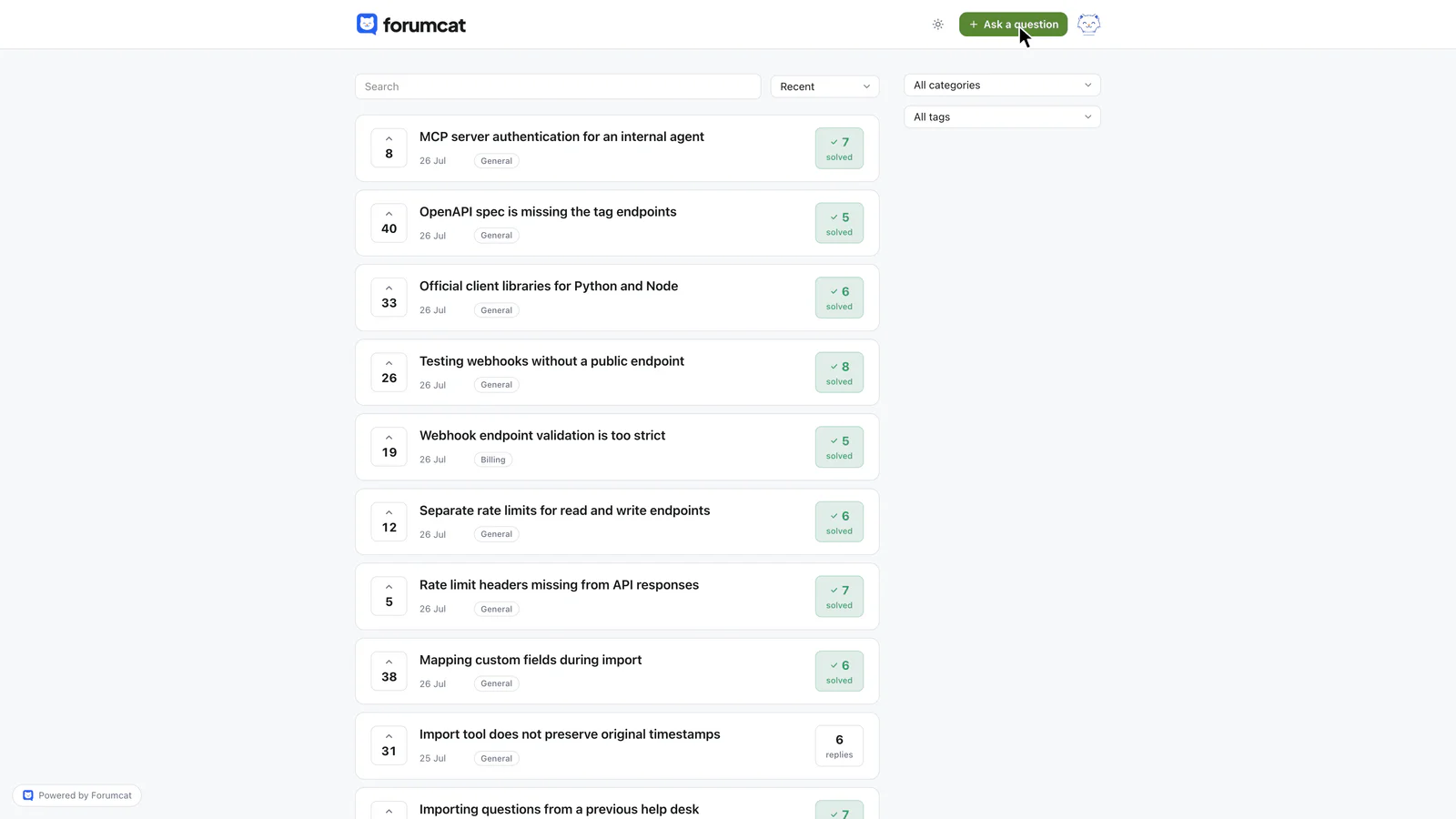
The public kind: every answer stays findable.
Pick by the job, not by the label
Customers keep asking to see last month's invoice. That is an account portal job. Customers keep asking how a feature works. That is a public answers job. The public layer might be a help center, a Q&A portal, or both.
Most companies end up with one of each. The account login handles "my invoice." The help center handles the guides you want to write with care. The public Q&A layer handles the questions you did not predict.
The common error is buying one kind and expecting it to do another kind's job. An account portal will not cut repeat how-to email, because those answers stay locked to one person. A help center will not show someone their last invoice. A Q&A portal will not run a refund for a single account. Your help desk still does that private, one-to-one work. A customer support portal of the public kind sits beside it.
A public answer serves more than one customer
A private portal helps one person per visit. Jane looks up Jane's order. That page has no second reader.
A public answer works for the next person too. You write it once. Every later searcher can use it. Customers start in Google. They type the problem in their own words. A thread titled in those words can appear in the results.
Say 30 emails a week ask how to change a billing card, and each reply takes ten minutes. That is five hours a week on a single question. Answer it once on a public page. Put the link in the automatic reply your mail tool already sends. The next 30 people can read it. Some will still email. Many will not.
That is why the public kind is the one that shrinks an inbox. The private kind still matters. It serves a different reader: this customer, this record, right now.
If you want customer questions and answers to keep helping after the first asker is gone, they have to live where later people can find them.
What a public Q&A portal needs to work
A useful public portal needs a short list of jobs.
It should live on your own domain (yourcompany.com) or a subdomain (a web address like help.yourcompany.com), so it sits next to the rest of your site. Search should cover every question and every answer. A customer who cannot find a match needs a way to ask. The asker or a staff member should be able to mark one reply as the accepted answer, so it pins under the question and the thread shows as solved. Staff replies should show the person's role next to their name, so an official answer looks official. People should be able to read and search without creating an account.
Forumcat is a hosted customer Q&A portal on your domain. Customers read and search without an account, the accepted answer pins under the question, and staff replies show the person's role. A new portal is live in about five minutes.

One shelf per topic, named in customer words.
Categories give the portal shelves people can browse when they are not sure what to type. Keep the list short. Billing, Getting started, and Using the product will cover most teams. Name the shelves the way customers speak.
A public answers layer can take the shape of a community help center, a Q&A list, or a support forum. The shared job is the same: one answer, many readers.
When a help center is no longer enough
You have outgrown "just a help center" when the same questions keep arriving by email even though the article exists. The page is live. People still write to you. They cannot find it, they do not trust it, or they describe the problem with words your docs never use.
A help center is written in your voice. Customers search in theirs. "How do I cancel," "stop my plan," and "I was charged again" can all be the same issue. If your article is titled "Managing subscriptions," the person who typed "I was charged again" may never see it.
A public Q&A thread starts with the customer's words. Later searches match because the question already used those words. Keep the help center for guides that need screenshots and a fixed order of steps. Add the Q&A layer for the questions that keep slipping past the docs. The longer split between articles and threads is in the knowledge base vs community forum comparison.
If you want to try a public Q&A portal, Forumcat is $9 one time on a Forumcat subdomain, or $99 a month for a custom domain.
Keep reading: the knowledge base vs community forum comparison, and how to set up a customer support forum, and how to build a customer community, and anonymous questions in a customer forum, and why public answers beat private email.