A welcome post on a support forum should do three things. It should say what the forum is for, show how to ask a question that gets answered, and say when staff reply. Staff means the people on your team who answer. Warmth is fine. A greeting by itself does not change how people post.
A welcome post is the first message a new member sees. Pin it at the top of the list. Pinning means the post stays at the top while new threads appear below it. A thread is one question with its replies. People also call this a community welcome message.
Here is a short version you can paste and edit. It does the three jobs above.
Welcome. This board is for questions about the product. Search first, then ask one question per thread, and write the title the way you would search it. Staff reply on weekdays within one working day. Mark the reply that solved it so the next person can find it.
Why a friendly welcome post usually fails
Most welcome posts come from social groups. They say hello. They ask people to introduce themselves.
On a social group, people often joined to talk, so a hello post can fit. On a support forum, people joined because they need an answer. Something is stuck, and they have a deadline.
An introduction is extra work with no payoff in that room. The person already has to explain the problem. A second post about themselves is another task, and many will skip it.
Start with the problem they came to solve. Tell them how to ask it so someone can answer. You can be warm when you reply on their thread.
Write the pinned welcome post in five parts
Keep the whole post under 300 words. People skim, so a short post gets read. Write it once and pin it.
What this forum is for
Say what belongs here, and say what should go to email instead. Paste the next three sentences and add your product name.
This forum is for questions about [product name]. Anyone can read the answers, including people who are not customers. For anything about your own account, your bill, or a security issue, email support instead.
A community help center needs the same split. Public how-to questions stay on the board. Personal account questions go to email.
How to ask so you get answered
Five rules cover it: search first, one question per thread, a title in plain words, what they already tried, and their plan or product version. A plan is the product level they pay for. Tell them never to include an account number.
Search the forum before you post. Your question may already have an answer. Ask one question per thread. If you have two problems, open two threads.
Write the title in the words you would type into search. Say what you already tried, include your plan or version, and never include your account number, invoice number, or password.
"The save button does nothing on the billing page" is a title people can find later. "Help please" is not a title people can find.
What happens next
Say who replies, roughly how fast, and what the accepted answer means. The accepted answer is the one reply later readers should trust.
A staff member replies on weekdays, usually within one working day. You, or a staff member, will mark one reply as the accepted answer. That reply sits under the question. The thread then shows as solved, so the next person can trust it.
Change the time window to match what you can keep. If you answer within two days, write two days. A promise you miss teaches people to email instead.
The link to the guidelines
Guidelines are the posting rules. Do not paste the whole rules page into the welcome post. Link to it instead.
The posting rules are here: [link]. Please read them before you post.
If you do not have that page yet, start from a community guidelines template. One short page is enough.
What gets removed
One line is enough. Name the things you will take down.
We remove spam, insults, and posts that share private data such as account numbers. The guidelines page can hold the rest.
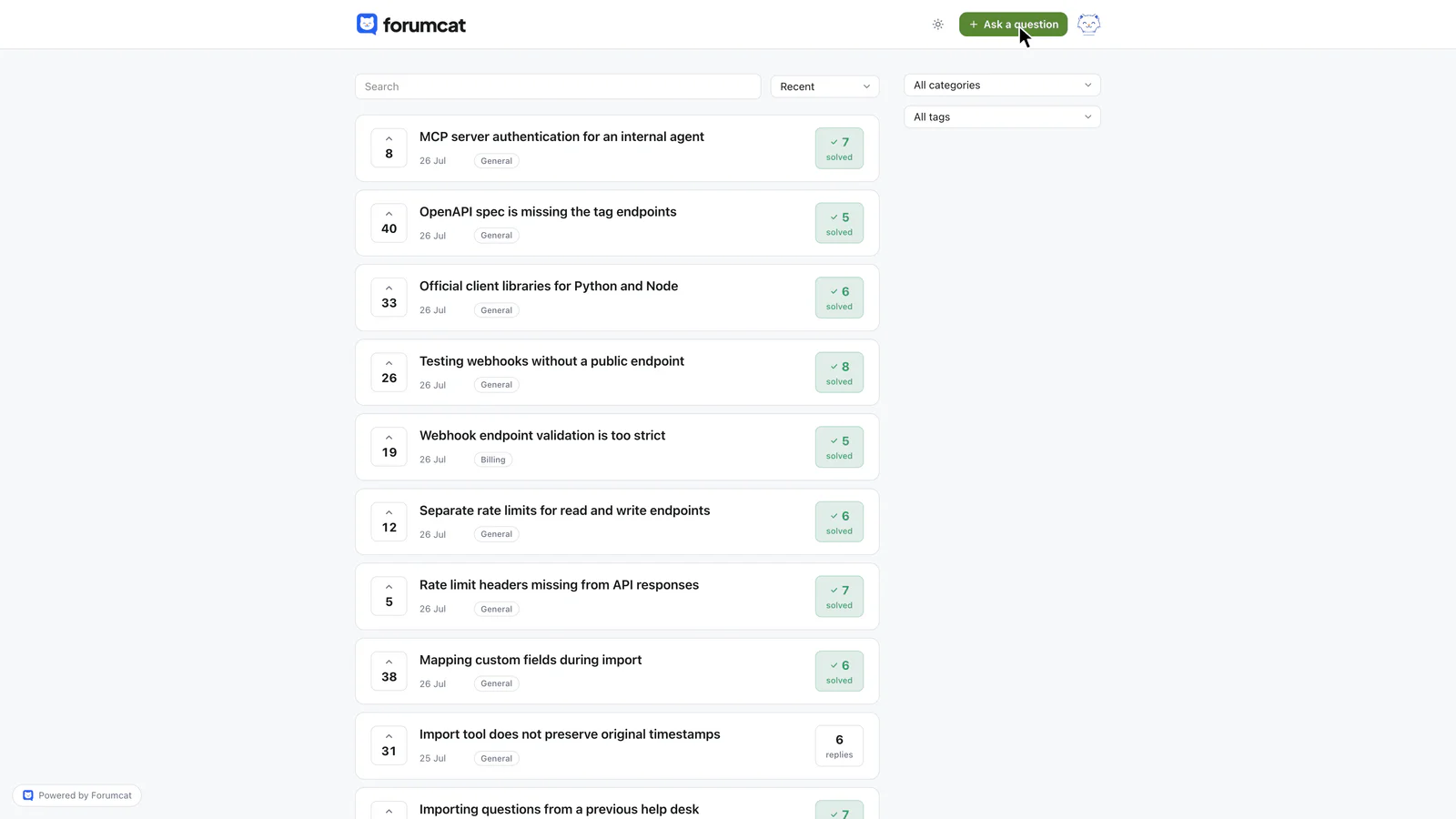
The welcome post sits above this list, and points at that button.
In the welcome post, name the Ask button so a new member knows the next click. That is the button they will use to post.
The first reply a new member gets
The first reply from staff matters more than the pinned post. Many people never read the pin. Everyone who asked reads the reply on their own question.
Give the reply three parts. Thank them, answer the question, and mention one thing they can do next.
Thanks for writing this up so clearly. The setting sits under Settings, then Billing, then Payment method. Once it is changed, mark this reply as the accepted answer so later readers see it first.
Skip stock phrases. A stock phrase is a line you paste into every reply, such as "welcome to the community." Answer the thing they asked, then give one next step.
If their question belongs in email, still thank them. Answer the part you can in public. Then say to email support for the account details.
This first reply is part of the daily pass. The daily pass is the short review you do each day. Running a customer community in 15 minutes a day covers that order of work.
Onboarding is three touches
Onboarding means the first instructions a new member gets. It is three touches. Skip a long series of welcome emails.
Touch one is the pinned welcome post. Some people read it. Many do not.
Touch two is the empty-state text on the ask form. Empty-state text is the helper text on a blank form, before anyone types. The ask form is the page where a customer writes a new question. Everyone who asks reads that text. It is the only onboarding copy that reaches every new poster.
Touch three is the first staff reply. Most teams write the pinned post and skip the other two. That order is backwards.
Write the form text first. Then write how you will answer. Then write the pin, as a short backup for people who scroll the home page. A community manager's first 30 days are for reading and answering, not for extra programs.
What to write on the ask form
Write three short lines. Write them as commands. A command tells the person what to do.
Search the forum before you post.
Write the title the way you would search it.
Leave out account numbers, invoices, and passwords.
No copy on the forum does more work. The person is about to post, and they are looking at the box. A three-line reminder at that moment beats a long pin they already scrolled past.

Onboarding that happens at the moment it matters.
The title field is where a person can still find an existing answer. If a matching thread already exists, they can open it and stop.
What to skip, and when to rewrite
Skip automated welcome direct messages. A direct message is a private note sent to one person. An automated message is one the software sends by itself. That note does not answer the problem they came in with.
Skip introduction threads, member-of-the-week posts, and a tour of every page. A member-of-the-week post names one person and asks the room to notice them. A tour is a walk through the forum's screens.
Those things cost attention. They return little until the forum is already busy. If the board is still thin, seed it with real questions before you add extra posts.
Rewrite the welcome post when you answer the same process question twice. A process question is a question about how the forum itself works, such as where to put billing questions. Rewrite when you add a category. A category is a named group of threads on one topic. Rewrite when reply times change, so the promise stays true.
Put a date at the bottom. Use a line like "Last updated 4 September 2026". Readers can then see the post is current.
On a Forumcat portal, a new member can read and search before signing in. Sign-in uses a magic link, a six-digit email code, or Google. A magic link is a sign-in link sent to email. A six-digit email code is a short number sent to the same address.
There is no password to invent, so your welcome post does not need a password section. While someone types a question title, existing threads that already answer it are suggested. Those suggested threads do more onboarding work than a pinned post.
There are no automated welcome messages and no onboarding emails. The three touches above are written once, by hand, even on a hosted support forum.
Keep reading: how to seed a new forum so it does not look empty and running a customer community in 15 minutes a day.