Seed a new forum with the ten to twenty questions your inbox already answers. Post each one in the customer's words. Answer it yourself. Mark the correct reply as the accepted answer. The accepted answer is the one reply later readers should trust. You then have a useful forum on day one, before a single visitor posts.
Seeding means writing those first threads yourself, so the board already has answers when people arrive. A thread is one question with its replies, both on public pages. This post covers where the seed questions come from, how to write them well, and how many you need before you share the link.
Write the first threads under your own name
People launching a forum this week often worry that this looks fake. It is a fair worry. You are posting the question. You are also posting the answer. A visitor can see both names.
The questions are real. A customer already asked them. You already answered them in mail. You are moving that work onto a page the next person can find. That work is documentation. Documentation means writing down what you already know, in a place later readers can use.
Post under your own name. Answer as yourself. If your tool shows a staff role next to your name, leave it visible. A staff role is the job label beside the name, such as agent or admin. Official answers should look official.
What would be fake is invented users. Do not make accounts that pretend to be customers. Do not write praise that nobody sent. Do not add fake replies to make the board look busy. Visitors notice names that never come back.
Before you post, cut anything private. Remove names, email addresses, invoice numbers, and account IDs. Keep the problem and the steps. The next customer needs the method. They do not need someone else's details.
Where the seed questions come from
Start with the support inbox. The support inbox is the mailbox where customers write when they need help. Open last month. Write down the questions that showed up more than once. The ten most repeated questions are your first ten threads.
Then open the mail you already sent. Look for answers you have typed twice. If you sent the same steps to two people, that answer belongs on the forum. Copy the steps. Rewrite them as a public reply. Strip the private parts.
Sales calls are a third source. A sales call is a talk with someone who is thinking about buying. Those people are called prospects. They ask the same few things each week. How billing works. Whether two people can share a login. What happens if they cancel. Put those questions on the forum too. Prospects can read them before they write to you.
Those customer questions and answers already sit in your mail and your calls. The forum is where they become pages other people can find.
Once the forum is live, watch empty searches. An empty search is a query that found no matching thread. The visitor already typed the words they use. Write that question next. Answer it. Mark it solved. A solved thread is a question with an accepted answer.
Say 15 emails a week ask how to change the card on file. Each reply takes ten minutes. That is 150 minutes a week on one question. One public thread, titled in those words, does that job after you write it once.
How to write a seed thread
A seed thread has four parts. The title. The question body. The answer. The mark that the answer is accepted.
Write the title in the words a customer would type. A title like "How do I change the card on file" uses the words they would search. A title like "Billing FAQ 4" uses a label they would not type.
The question body is two or three sentences. State the problem. State what they already tried, if you know. A customer wrote that they cannot change the card on the billing page. They tried the save button and saw an error. That is enough. The next reader wants to match their problem in a few seconds.
The answer should be complete and plain. Name the page. Name the button. Name what should happen when it works. Stop when the job is done. Do not add extra sales language.
Then mark the reply as the accepted answer. On Forumcat, the asker or a staff member marks it. The accepted answer pins under the question. The thread shows as solved. A solved thread is the unit of a healthy forum. One question. One trusted reply. A later reader can use it without guessing.
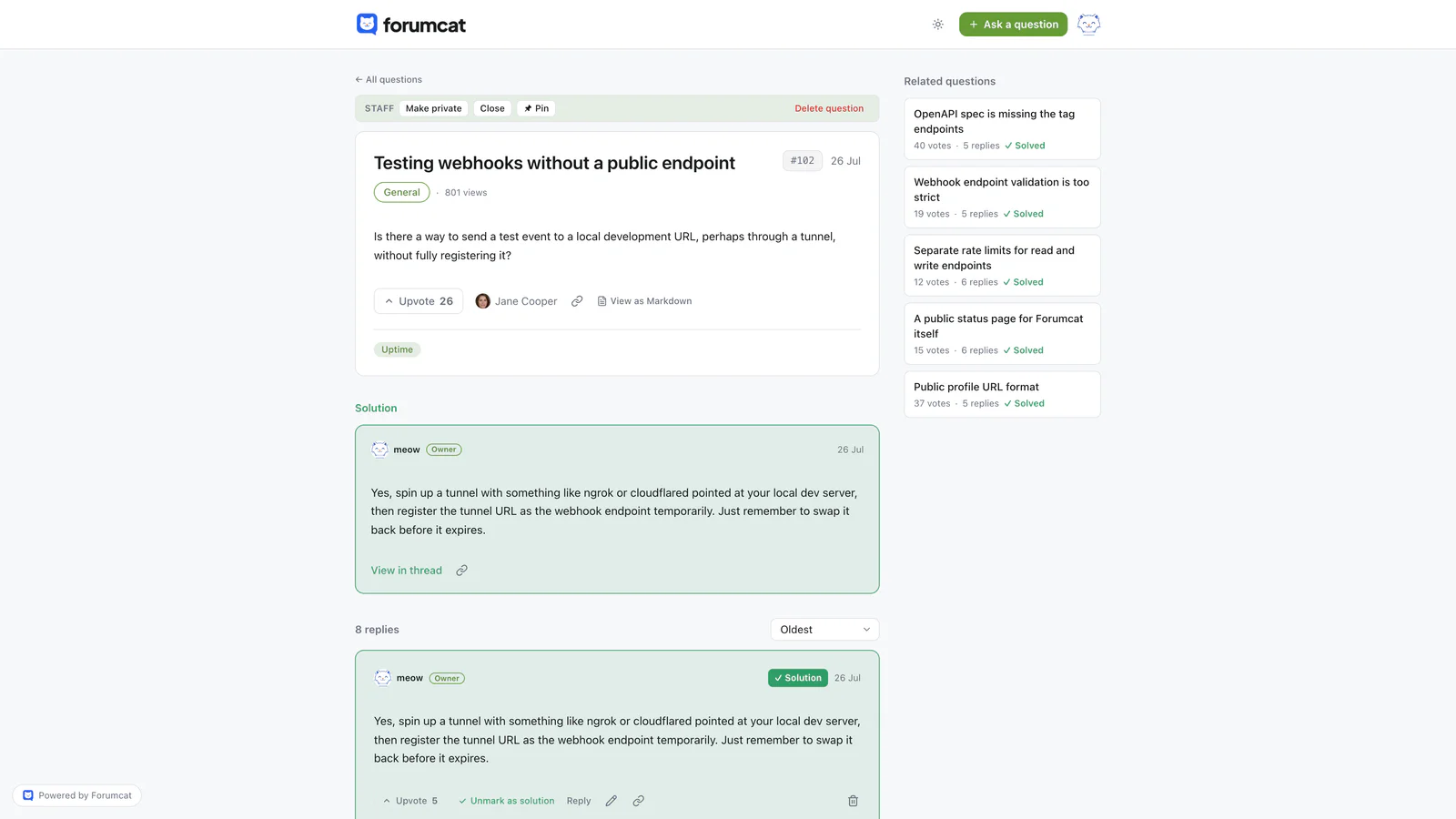
The unit of a healthy forum: one solved thread.
While a customer types a new question title, Forumcat suggests existing threads that already answer it. Your seed answers then show up at the moment someone is about to ask the same thing again.
How many threads is enough
Ten solved threads is the minimum. Twenty is comfortable. You can go live at twenty. You can add more later from empty searches and from new mail.
Three to five categories is enough. A category is a named group of threads on one topic. Name the groups the way customers speak. Billing. Getting started. Using the product. Troubleshooting. Account.
A forum with two empty categories looks worse than a forum with none. Empty shelves say nobody uses this place. A few filled shelves say answers live here.
If you only have enough threads for three categories, make three. Do not open fifteen rooms and hope they fill. You can split a category later, when it is too long to scan.

Ten solved threads read as a place answers live.
What to do in the first two weeks
The seed gives visitors something to find. Sending people to the forum on purpose is what starts real use. That sending is called routing. Routing means you point a repeat question at a public thread, instead of answering it only in email.
When a repeat question arrives by email, answer it on the forum first. Then send the person the link. You still helped them. You also left a page for the next person with the same problem.
Put the forum link in three places. Your site menu. Your email signature. The auto-reply that goes out when someone writes support. An auto-reply is the message your mail tool sends as soon as a customer writes in. Those are the places customers already look.
Answer anything new within a day. In the first two weeks, speed matters. A short, correct answer today helps more than a long one next week. You can come back and add steps later.
If nobody posts for a few days, that is normal. Keep routing. Keep answering. The first real visitor question is the sign that people have found the room.
What not to do
Do not create fake accounts. Do not invent activity so the board looks busy. Do not write reviews of your own product in a customer's voice. Visitors notice. Your team notices too.
Do not post engagement prompts into an empty room. An engagement prompt is a post that asks people to chat, such as a request to name a favorite feature. With no members, it sits there with zero replies. A quiet board of solved threads is easier to trust.
Do not make fifteen categories on day one. Three to five filled shelves beat a long list of empty ones. Skip points, badges, and welcome campaigns until people already use the place. Those tools reward a crowd. You do not have a crowd yet. You have twenty answers and a habit of sending people there.
A hosted support forum on a Forumcat subdomain is $9 one time. A subdomain is a web address like yourcompany.myforumcat.com. There is a 7-day free trial, and you do not need a card.
Keep reading: how to build a customer community and how to set up a customer support forum, and a support forum for an early-stage startup, and welcome posts for new members.