A small customer community needs one person, 15 minutes a day, and a fixed order of work. Answer new questions. Mark the reply that solved the problem as the accepted answer. The accepted answer is the one reply later readers should trust. Close finished threads. Check the searches that found nothing. Then you are done for the day.
That sequence is community management for a support community. Community management means keeping a public Q&A room current, so customers can find answers without emailing you. A support community is not a social network. Volume stays low. Questions are concrete. Most days, nothing dramatic happens. A fixed small routine keeps the room current. A vague plan to post more often usually fades after two weeks.
If you already run a community help center, the daily work is review. You are not trying to entertain a crowd. You are keeping answers findable.
Answer new questions first
The person who posted is waiting. Start there.
Open the list of new and open questions. Read the newest ones first. If you know the answer, write it. If you need to check the product, say you are looking. Come back the same day when you can.
Give this five to eight minutes. A small community often has zero or one new question. Some days you will spend the whole 15 minutes here. That is the right use of the time. An unanswered question is what makes the room look abandoned.
If a customer already answered well, add a short staff note. Say the steps are correct. Staff replies should show the person's role next to their name. A role is the job title shown beside the name, such as agent or admin. Official answers then look official.
If you use Forumcat, this routine sits on two screens. A questions list is where you review and moderate threads. Moderate means handle the thread: answer it, mark it solved, or close it. A members page is where you handle the rare suspension.
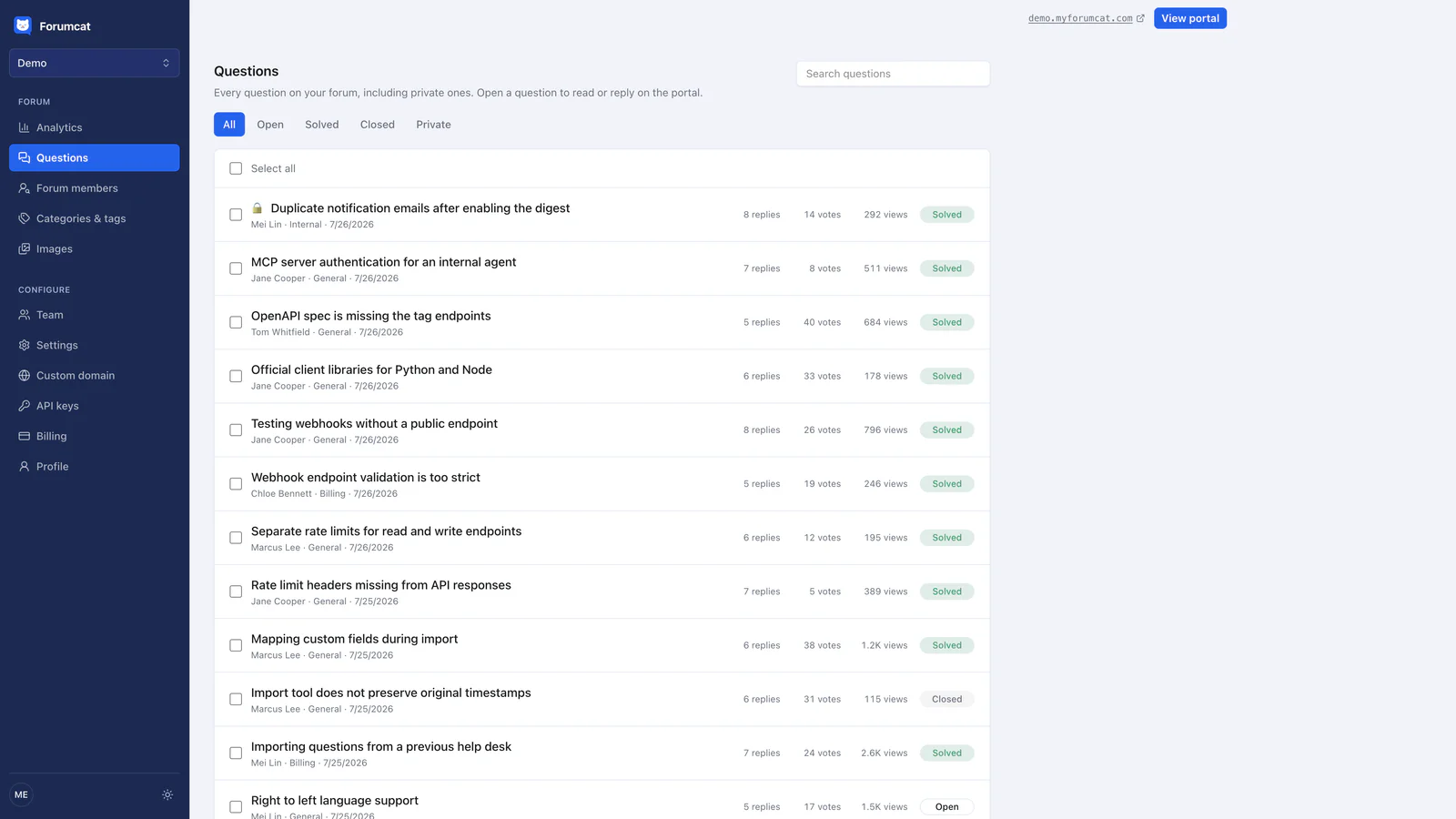
The whole daily review, one list.
Mark the reply that worked
Later readers need to know which reply to follow. Several replies can all sound plausible. One of them is the one that actually solved the problem.
The asker or a staff member marks that reply as the accepted answer. It pins under the question. The thread then shows as solved. A solved thread is a page the next customer can trust.
This takes about a minute per thread. Do it the same day you answer, while you still remember what worked. If a customer wrote the useful reply, mark theirs. You still want the pin. The next reader should not have to guess.
Leave a thread unsolved only when you are still waiting on a real next step. A maybe-correct reply is not an accepted answer. Mark it when you know.
Close finished threads
An open list full of old, solved threads is hard to scan. Close the ones that are done. Closing means the thread is finished. It leaves the open queue. People can still read it and search it.
A tidy list of solved threads looks like someone is paying attention. People search it. They trust it. A long open list of month-old questions looks like a room nobody tends.
Give this two minutes. If a thread is waiting on the customer, leave it open. If the answer is up and the asker has gone quiet, close it. You can reopen it if they come back.
Check searches that found nothing
After the live questions, look at searches that returned no useful thread. Those are called empty searches. They tell you which answers to write next. A customer already typed the words they use.
If your tool shows empty searches, write them down. If it does not, keep a running note. Add a line when you or a teammate cannot find an answer. Post that question in the customer's words. Write the answer. Mark it solved.
This is often three to five minutes. Some days the list is empty. Skip it. Some days one query shows up twice. Write that answer first.
Say three people a week search for "change the card on file" and find nothing. Each then emails you. Each reply takes ten minutes. That is 30 minutes a week on one missing page. One public thread, titled in those words, does that job after you write it once.
A 30-minute pass once a week
Once a week, take 30 extra minutes.
Skim the busiest threads. Fix any wrong answer that showed up later. Products change. A reply that was right in March can be wrong in September. Edit it, or add a new accepted answer.
Thank one customer who helped another. A short public note is enough. People who answer well will often do it again if they know you saw it.
Note which questions suggest a product fix. If several people asked how to export a file, the product may need a clearer button. Write that down for the product team. The community is a list of stuck moments, in the customers' own words.
Do not turn this weekly pass into a publishing calendar. You are checking quality. You are saying thank you. You are sending one note to product.
Write three rules and use them
Most customer communities see very little bad behavior. People come with a problem. They want an answer. They leave.
Write three rules and post them where people can find them. A simple set is: stay on the product, no insults, and no posting other people's private data. Remove what breaks them. Suspend repeat offenders. Suspend means that person cannot post for a while, or at all.
Moderation is the work of keeping the room usable. You do not need a large team for a quiet Q&A room. Have the rules. Use them when you must. Then go back to answering questions.
The members page is for that rare bad day. Search for the person. Take the action. Then return to the questions list.

Member management for the rare bad day.
When 15 minutes is no longer enough
Watch for three signs.
Question volume grows past what one person can answer in 15 minutes. You are still finishing yesterday's questions today. More than one language shows up, and you cannot answer all of them well. Private cases mix into the public room. Private cases are account-specific problems, such as a refund or a bug in one account.
When that happens, add a teammate with a role. Give them a named job, such as agent, so their replies look official. Split the 15 minutes. One person takes new questions. One person takes empty searches and the weekly review. Do not add a second tool for the same Q&A work.
Keep private cases off the public list. If your tool can mark a question private, use that. A private question is visible to the asker and staff only. Your help desk still handles the cases that need account access. The public room sits beside it as the self-serve layer.
A hosted support forum on a Forumcat subdomain is $9 one time. A custom domain is your own address, like help.yourcompany.com. That plan, with higher caps, is $99 per month. There is a 7-day free trial, and you do not need a card.
Keep reading: how to build a customer community and how a self-service forum cuts support tickets, and how to moderate a forum part time, and a community manager's first 30 days.