A customer forum with a few new posts a day needs one person for about fifteen minutes, once a day. Read the new posts. Take out any private data. Fix titles nobody would search for. Answer what you can answer. Close exact duplicates and leave a link to the original. Mark solved threads solved. Everything else can wait until tomorrow.
Moderating means deciding what stays, what gets fixed, and what gets taken down. This post covers those decisions, the order to make them in, and the cases that are harder than they look.
What moderating a support forum means
Moderation here is three decisions: what stays as it is, what gets fixed, and what gets removed.
A customer support forum is easier to moderate than a social community. People arrive with a problem. They want it solved, and then they leave. Long arguments are rare, because nobody came to argue.
That changes the work. Most of your time goes on making threads findable. Very little goes on policing behavior. A thread is one question with its replies, on a public page. The next customer has to find that page and follow it.
The daily routine for the whole forum is a separate job. Answering, marking threads solved, and checking searches that found nothing are covered in running a customer community in 15 minutes a day. This post stays on the judgment calls.
The daily pass, in order
Do the pass once a day, in a fixed order. The first steps are the ones that cannot wait.
- Open the list of unanswered questions. Unanswered means no staff reply yet, or no accepted answer yet.
- Read the new posts oldest first. The person who waited longest gets your attention first.
- Remove any private data you see. That means account numbers, invoice numbers, home addresses, and screenshots showing an email address.
- Fix titles that nobody would search for.
- Answer anything you can answer. Pass the rest to the person who can.
- Close exact duplicates. Always leave a link to the original thread.
- Mark solved threads solved. The accepted answer is the one reply later readers should trust. It pins under the question.
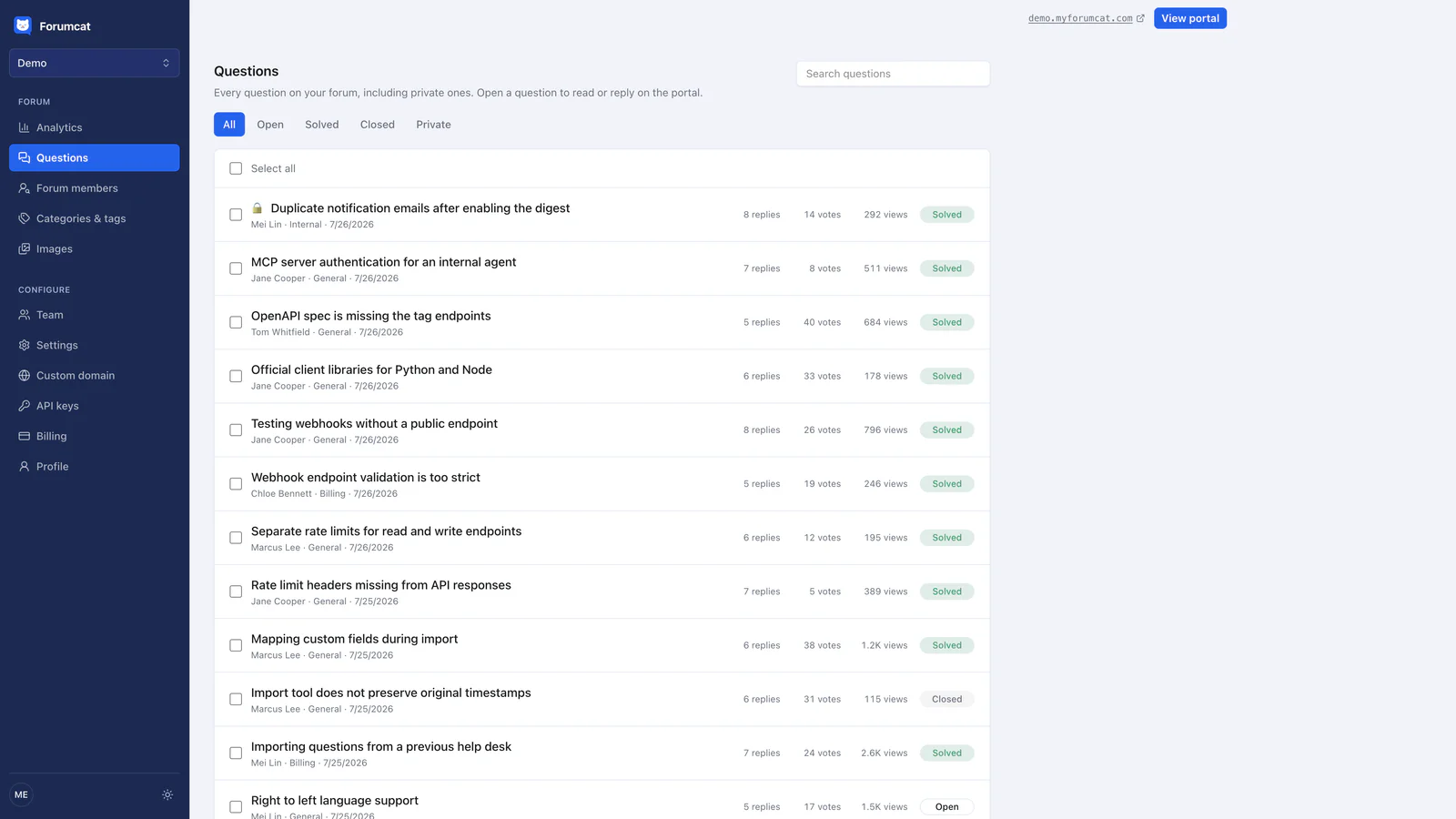
The daily pass starts with one list.
On a quiet day this takes ten minutes. On a busy day it takes twenty. If you run out of time, stop after step five. The unanswered person matters more than a tidy list.
Use the smallest action that fixes the problem
Pick the lightest action that solves what is actually wrong. A heavier action costs you trust, and it rarely helps the next reader.
Edit when the post is fine and the title is not. Leave the words of the question alone. Change the title to what a customer would type. If you edit anything inside the body, say so in a short line at the end.
Reply in public when the rule is worth teaching. Someone posts a support question in the wrong category, or pastes three questions into one thread. A calm public reply teaches the pattern to everyone reading. Three short rules on a page cover most of it, and there is a community guidelines template if you want a starting point.
Close when the question is answered elsewhere, and always leave the link. Closing means the thread is finished and leaves the open queue. People can still read it. A close with no link reads as a door shut in someone's face.

Closing with a link to the original is the common case.
Remove when there is private data, spam, or abuse. Removal is for content that should not be on a public page at all. It is not for a post you disagree with.
Suspend only for the same behavior a second time. Suspend means the person cannot post for a while. Say what the rule was the first time. If they do it again, act, and tell them why in one plain sentence.
Fixing bad titles is the highest-value edit
The title is what the next person searches, so a bad title wastes a good answer.
"Help!!" tells a later reader nothing. "Card declined when updating billing" tells them everything in six words. The answer inside both threads can be identical. Only one of them will be found.
Rewrite the title in the words a customer would type. Use the words from the body of their post. Keep the customer's own phrasing where you can, because that is the phrasing other customers will use.
This edit takes about ten seconds. It turns one answered question into a page that keeps answering. Do it for every new post, before you write your reply.
Private data cannot wait a day
Private data is the one thing you fix the moment you see it. Everything else on this list can wait until tomorrow's pass.
Watch for account numbers, invoice numbers, order numbers, phone numbers, home addresses, and API keys. An API key is a secret string that lets software sign in as that customer. Screenshots hide a lot of this. Check the corners of an image for an email address or a name.
Edit the detail out. Then tell the person why, in one short public line. Most people are grateful. They pasted the whole screen because they were stuck, not because they wanted it public.
Then move the detail somewhere private. On Forumcat, a question can be made private, so only the asker and staff can see it. The other route is email. A customer support portal works best when the public part stays free of one person's account details.
The hard cases
Four situations come up often enough to plan for. None of them needs a policy document.
An angry customer who is right gets answered first, and in public. Do not move the thread to email to make it quiet. Say what went wrong, say what you are doing, and give a date if you have one. Other readers are watching how you handle it, and a fair public answer is worth more than a hidden one.
A public bug report stays public. Confirm you can reproduce it, or ask for the one detail you need. Post back on the same thread when it is fixed. People search for the bug, so the fix should live where they will look.
A competitor posting is usually harmless. If the post is a real question, answer it like any other. If it is an advertisement, remove it as spam. Do not argue with them on the thread.
A member who answers everything and is often wrong is the delicate one. Thank them in public, then correct the facts, never the person. Write the correct answer as a normal reply. Mark the correct reply as the accepted answer, so later readers follow that one.
What to skip, and when one person is not enough
Skip real-time monitoring. A support forum does not need someone watching it all day. Once a day is enough at this size.
Skip approval queues. An approval queue holds every post until staff release it. It turns a forum into a form, and the delay teaches people to email you instead. Post first, review after.
Skip building a moderation team you do not need. One named owner beats three people who each assume another will look.
One person stops being enough at three signs. The first is more than about twenty new posts a day. The second is customers in a second time zone waiting overnight. The third is a week when you are away. The fix is a second person with staff rights, not a longer rulebook.
On Forumcat, staff can pin a thread, close it, and mark the accepted answer. Five roles exist (owner, admin, agent, finance, member), so a helper can be given staff rights for this routine. A question can be made private when it holds account detail. There is no approval queue, so posts appear first and a person reviews them after. A hosted support forum on a Forumcat subdomain is $9 one time, with a 7-day free trial and no card.
Keep reading: running a customer community in 15 minutes a day and how to set up a customer support forum.