You can set up a customer support forum today. A hosted tool takes minutes. If you install the software yourself, plan for a longer first day, plus the server work after that. What decides whether anyone uses it is the first ten answers, and the first two weeks of sending people to those pages.
Pick hosted or self-hosted. Create the forum. Add three to five categories named the way customers talk. Post the ten questions your inbox already answers. Link the forum in your site nav, your email signature, and your auto-reply. When a repeat question arrives by email, answer it on the forum and send the link.
Pick hosted or self-hosted
Self-hosting means you rent a server, install the forum software, and keep it running. You choose the code, the extra plugins (small add-ons that change how the forum works), the mail setup so sign-in emails arrive, and the backup plan. You get full control. You also get update days, failed upgrades, and hours that never appear on a price page.
A hosted forum is the other trade. A company runs the software. You pay. You sign in, name the forum, and it is live. You give up root access to a machine most support teams did not want to tend. You get your evenings back. If you want that trade written out in one place, read a plain comparison of hosted forums vs self-hosting, then pick any tool that matches how you like to spend time.
If you already run servers and you want to change the code, self-host. If you want a working forum and you do not want a second job, go hosted.
Create the forum
Most hosted tools share the same first screen: a name, a web address, a create button.
This example uses Forumcat so the clicks are real. Sign in, pick a name, and pick an address on a Forumcat subdomain (a web address like yourcompany.myforumcat.com). Upload your logo. Pick the accent color from your site so buttons and links match. The forum is live in about five minutes, with nothing to install. A hosted support forum on a subdomain is $9 one time. There is a 7-day free trial, and you do not need a card.
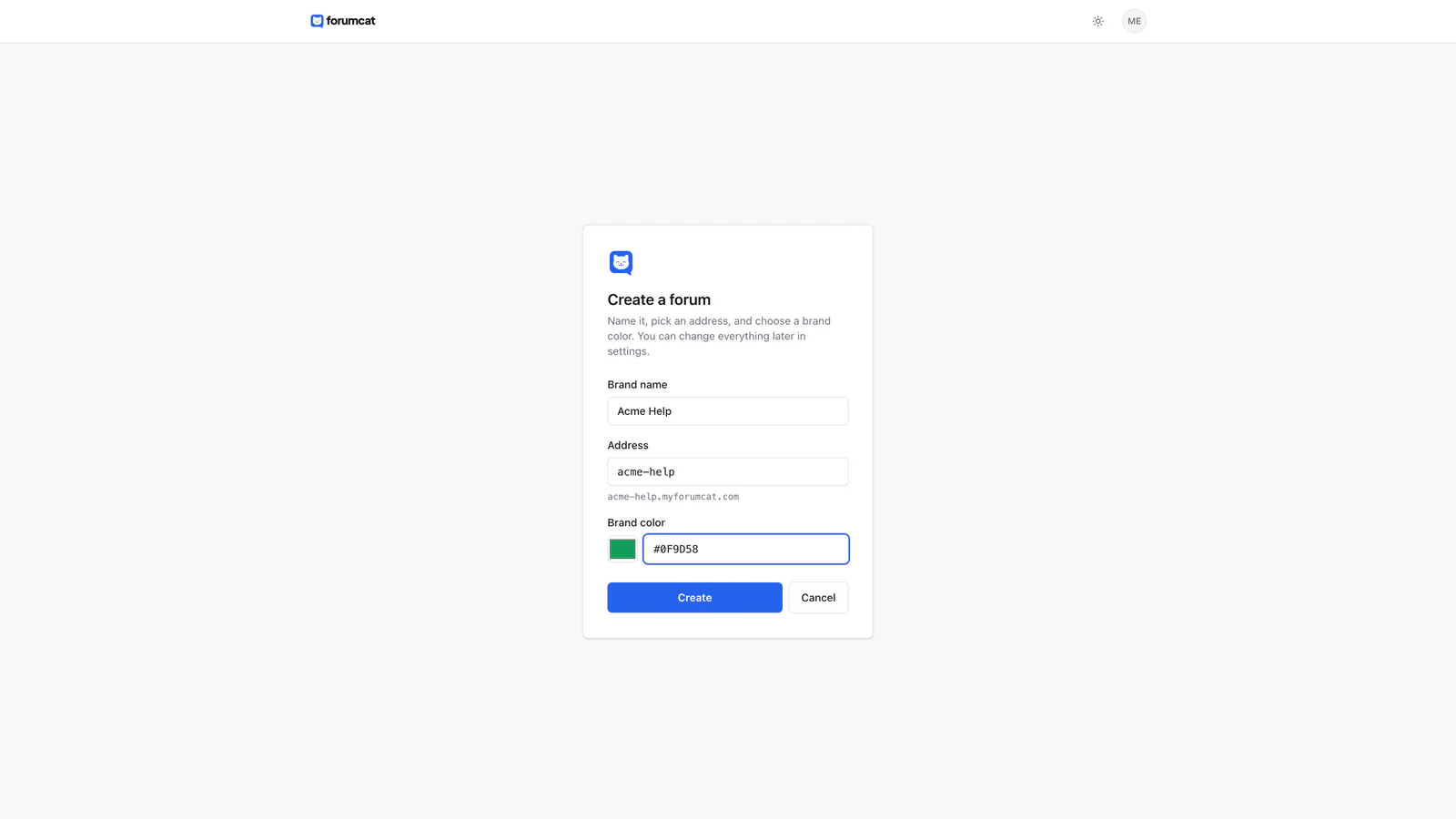
The setup form: name, address, create.

Make it look like your site before you share the link.
Other tools follow the same shape. They differ mainly in how long this step takes. A self-hosted install waits on the server, the database (where posts are stored), mail, and the first working backup. If you follow this example, the setup docs cover the same clicks.
Make three to five categories
Start with three to five categories, not fifteen. A new forum with fifteen empty rooms looks dead. Three shelves that already have a few threads look like a place people use.
Name them the way customers speak: Billing, Getting started, Using the API, Troubleshooting, Account. Those are the words people type when something is stuck.
Do not name categories after your org chart. Engineering, Finance, and Customer Success are how you sit. A customer with a failed charge is looking for Billing.
Pull the names from your inbox. If half of last month's mail is "how do I invite a teammate" and "how do I change the card", you already have Getting started and Billing. Leave a catch-all only if you must, and rename it once a real cluster shows up.
You can split a category later, when it is full. Empty rooms on day one help no one.
Seed it with ten answered questions
An empty forum reads as abandoned. Ten solved threads read as a place answers live.
Open last month's inbox. Pick the ten questions you already typed an answer for, more than once. Post each one as a question, in the customer's words. Then post the answer you already send. Mark that reply as the accepted answer. On Forumcat, the accepted answer pins under the question, so the next reader sees it first.
Strip anything private before you post. Cut names, email addresses, invoice numbers, and account IDs. Keep the problem and the steps. The next customer needs the method, not someone else's details.
Write the title the way a person would search. "How do I change the card on file" is a title. "Billing FAQ 4" is a filing label, and people do not search for filing labels.
If you cannot find ten repeats, start with five. A thin, solved forum still works. An empty one does not.
This is work you have already done. You are moving answers out of a private inbox and onto a page the next person can find.
Send people to the forum
A forum grows when you send people there, on purpose, for two weeks.
Add the link to your site nav or help menu. Add it to your email signature. Add it to the auto-reply that goes out when someone writes support. Those three places are where customers already look. One buried page in a footer is easy to miss.
When a repeat question arrives by email, answer it on the forum first, then send the person the link. You still helped them. You also left a page for the next person with the same problem.
Say 20 emails a week ask how to reset a password, and each reply takes five minutes. That is 100 minutes a week on one question. One public thread, plus a line in the auto-reply, does that job after you write the answer once.
Write the auto-reply in plain words. "We got your mail. You can also search past answers at [forum address]. If you find the same question, the accepted reply is the one that worked." Then keep moving repeats onto the forum when they show up again.
People show up because you put the link in front of them and you keep doing it. That habit is the whole growth engine.
Keep it healthy in 15 minutes a day
Set a timer for 15 minutes. That is enough at the start.
Answer new questions first. If a reply is the right one, mark it accepted so the thread shows as solved. Close what is done.
Then look at searches that return nothing. Those queries are your next answers. A customer already told you the words they use. Post the question in those words, write the answer, mark it solved.
If your tool does not show empty searches, keep a running note. When you or a teammate cannot find an answer, write the query down. That list is the same signal.
One person who already answers email can keep a small forum current. Miss a day and nothing breaks. Miss two weeks and the place starts to look stale, which is when people go back to email and stay there.
What to skip at the start
Skip a custom domain until the forum earns it. A custom domain is your own address, like help.yourcompany.com. It looks like your site. It also is extra DNS work (the records that point a name at a server) on a day when you still need ten answers more than you need a prettier URL. Use the address the tool gives you. Move later, once people already use the forum.
Skip gamification. That means points, badges, and leaderboards that try to make posting feel like a game. You do not have a crowd yet. You have ten threads and a habit. Badges on an empty board do not write the next answer.
Skip extra categories. Skip extra moderators. One person who owns the 15 minutes beats five people who each think someone else will log in.
Add those things when the forum is already in use.
Keep reading: how a self-service forum cuts support tickets and what a customer portal is, and should you self-host your forum, and how to seed a new forum, and a community guidelines template.