Good community guidelines fit on one page. They say what the forum is for, what gets removed, and who decides. Twelve clauses cover a support forum: what the forum is for, be kind, one question per thread, searchable titles, search first, no private data, stay on topic, no spam, how staff answers work, what we edit or remove, how to disagree with a moderator, and where security and account problems go. Example wording for each clause is below. Copy it, change the words so they sound like your company, and publish it.
Community guidelines are the rules for posting on your forum. Moderation is the work of applying those rules. The wording here is ours, written for a support forum.
Why a support forum needs its own rules
A support forum is different from a social community, so the usual community rules do not fit. People arrive with a broken product and a deadline. They want an answer.
Most rule templates are written for membership groups and social communities. They cover tone, self-promotion, and staying friendly. Those clauses still matter here. They are not enough on their own.
Two problems are specific to support. The first is private data. Customers paste invoice numbers, order numbers, and screenshots that show an email address. Once that sits on a public page, anyone can read it.
The second problem is findability. Every thread is a page the next customer may land on. A thread is one question with its replies. Threads with two questions in them, or titles like "urgent help", are hard to find later. Half your rules exist to keep pages findable.
That is the difference between rules for a customer community and rules for a social one. Yours protect private data and keep answers easy to find.
The template: twelve clauses you can paste
Each clause below has a short heading and example wording. Use the heading on your page. Edit the wording to match how your team speaks.
1. What this forum is for
Use this forum for questions about the product. Anyone can read the answers here, including people who are not customers. For anything about your own account or your bill, email support instead.
2. Be kind, even when the product broke
Something may be broken, and that is frustrating. Write about the problem, not the person. We answer faster when we can see what went wrong.
3. One question per thread
Post one question in each thread. If you have two problems, open two threads. Single-question threads are easier for the next person to find and follow.
4. Write the title in the words you would search
Write the title the way you would type it into a search box. "The save button does nothing on the billing page" works well. "Help please" does not help anyone find your thread.
5. Search before you post
Search the forum first. Your question may already have an answer. If you find a thread that is close but not the same, link to it in your post.
6. Never post private data
Do not post account numbers, invoice numbers, card details, or your home address. Check screenshots for an email address before you upload them. If we need your account details to help, we will ask you by email.
7. Keep it about the product
Posts should be about using this product. General industry chat, job posts, and news belong somewhere else. We close off-topic threads and say why.
8. No spam, no affiliate links, no recruiting
Do not post ads, referral codes, or affiliate links. Do not use the forum to recruit people. Links are welcome when they help answer the question.
9. How staff answers work
Staff replies show a role next to the name, so you can tell who works here. The person who asked, or a staff member, marks one reply as the accepted answer. That reply pins under the question and the thread shows as solved. Solved threads stay up, because the next person with the same problem needs them.
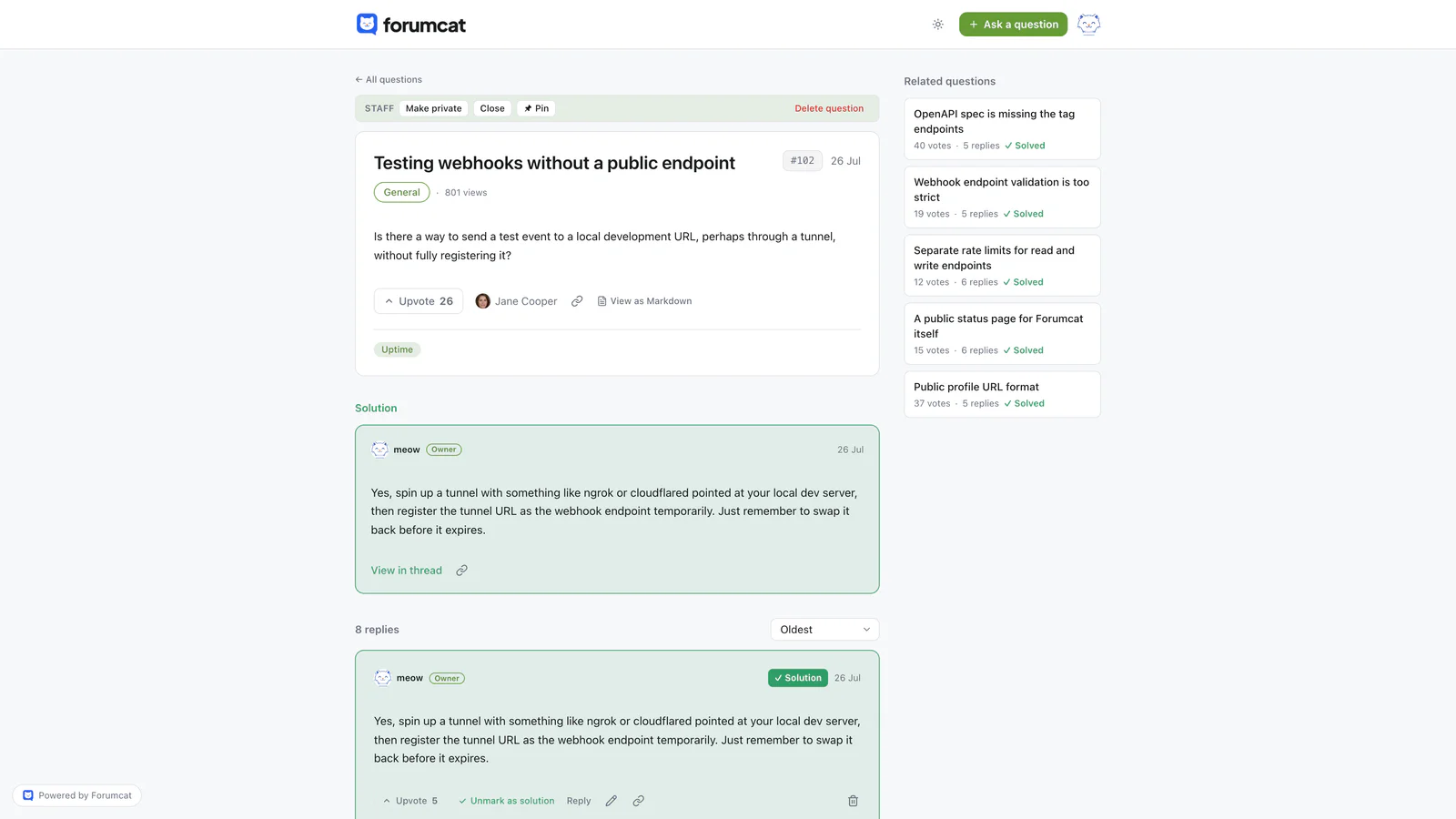
The accepted answer is what the rules point at.
10. What we edit, close, or remove
We edit posts to take out private data. We close threads that are answered or off topic. We remove spam. When we do any of this, we say so in the thread.
11. How to disagree with a moderator
If you think we got a decision wrong, email us. Please do not argue about it inside the thread. We will explain the decision, and we change it when we are wrong.
12. Security reports and account problems
Do not post security problems in public. Email us instead and we will reply. Account and billing problems also go to email, because they need details that should stay private.
How to write a clause
Name the behavior, not the person. "Posts that include card numbers get edited" is a rule. "Do not be the kind of person who posts card numbers" is an insult.
Say what to do, not only what to avoid. A rule that ends with a next step teaches. "Email support for billing" is more useful than "no billing posts".
Keep each clause to one or two sentences. If a clause needs a paragraph, it is probably two clauses. Write in the same voice your team uses in email.
Skip legal language. Your terms of service handle the legal side. Terms of service are the contract a customer agrees to when they sign up. Guidelines are house rules for posting, in plain words.
Where the guidelines page lives
Rules only work when people see them. Put the page where a person meets the forum for the first time.
- Pin the page at the top of the forum, so it stays above the newest threads.
- Link it from the form where someone writes a new question.
- Link it from the auto-reply your mail tool sends when a customer emails support.
- Link it from the footer of the forum, next to your terms of service.
One page is enough. Do not split the rules across three places, because then nobody knows which page is current.
How to enforce the rules
Enforcement has five steps, from smallest to largest. Edit the post. Reply in the open. Close the thread. Remove the post. Suspend the member, which means they cannot post for a while.
Use the smallest step that fixes the problem. Most rule breaks are accidents. Someone pasted an invoice number without thinking about who can read it.
Say what you did and why, in the thread. "I removed the invoice number from this post, because the page is public." That one sentence teaches every reader, not only the person who posted. Silent edits look like censorship.
Enforcement should stay small work. A quick daily pass over new posts is usually enough, and moderating a forum part time covers how to keep it that short.
When to update the page
Update the page after the forum teaches you something. Three moments are worth watching for.
The first moment is the first argument. When two people fight in a thread, you learn whether your tone clause is clear enough. The second is the first data leak. When someone posts an account number, check whether clause 6 says plainly what counts as private data.
The third is any clause you had to explain twice. If two people read a rule the same wrong way, the rule is unclear. Rewrite it in their words.

Closing a thread is usually enough. Removal is the last step.
Put a date at the bottom of the page, such as "Last updated 4 September 2026". Readers can then see the rules are current.
What the software does for you
Some clauses are easier to keep when the tool helps. On Forumcat, staff replies show the person's role next to the name, so clause 9 is true by default. The asker or a staff member marks one reply as the accepted answer, and it pins under the question.
A question can also be made private, so only the asker and staff can see it. That is the practical answer to clause 6. When a customer needs to share an order number, the thread can hold it without becoming a public page.
Your removal clause is still done by a person reading new posts. Any hosted support forum still needs someone to look at the board each day.
Keep reading: running a customer community and how to set up a customer support forum.