A customer community begins as a public place where questions get answered. It does not begin with events, badges, or a posting schedule. Pick one place where customers can ask in the open. Answer the questions your inbox already gets. Keep doing that for 30 days. At the end you will have a small community that is useful on day one. Everything else can be added later.
Here is a 30-day plan. It assumes a small company with no crowd yet and nobody free to run one full time.
Why answers come first
People need a reason to show up. An answer is a reason. Someone has a problem right now and wants it fixed. If your page fixes it, they stay for a minute and remember where they were.
Answers also keep working after you write them. One clear answer can help people for years. A post that asks "what is everyone working on this week?" is read once and then goes quiet.
There is a second gain. Every question you answer in public is a question you stop answering by email. Say 30 emails a week ask the same five things. At ten minutes each, that is five hours a week. Answer those five things in public once and a good share of that time comes back to you. That saving is what pays for the effort. It is the whole case for customer community software in one paragraph.
Why "engagement first" stalls for small companies
Most guides open with engagement. Set a posting schedule. Run a welcome thread. Plan a monthly event. That advice comes from large communities that already have members.
You do not have members yet. A prompt posted into an empty room gets no replies. Then the empty room is the first thing a new visitor sees. That looks worse than having no community at all.
Questions work differently. A prompt asks a stranger to give you something. An answer gives the stranger something first. Early on, only one of those two will work.
Days 1 to 7, set up the room
Start by picking where the questions will live. It should be public, easy to search, and readable without an account. Most people who read your answers will never sign up, and they should not have to. If you are still weighing options, our community platform page covers what to look for.
This is the job Forumcat does. It is a hosted question and answer portal on your own domain or a Forumcat subdomain. It goes live in about five minutes, with nothing to install. Categories, search, and accepted answers are built in, and anyone can read and search without signing in.
Next, make three to five categories. Name them the way customers speak, not the way your team is organized. "Billing and refunds" is better than "Revenue operations". Keep the list short. A long list of empty categories makes the place look abandoned.
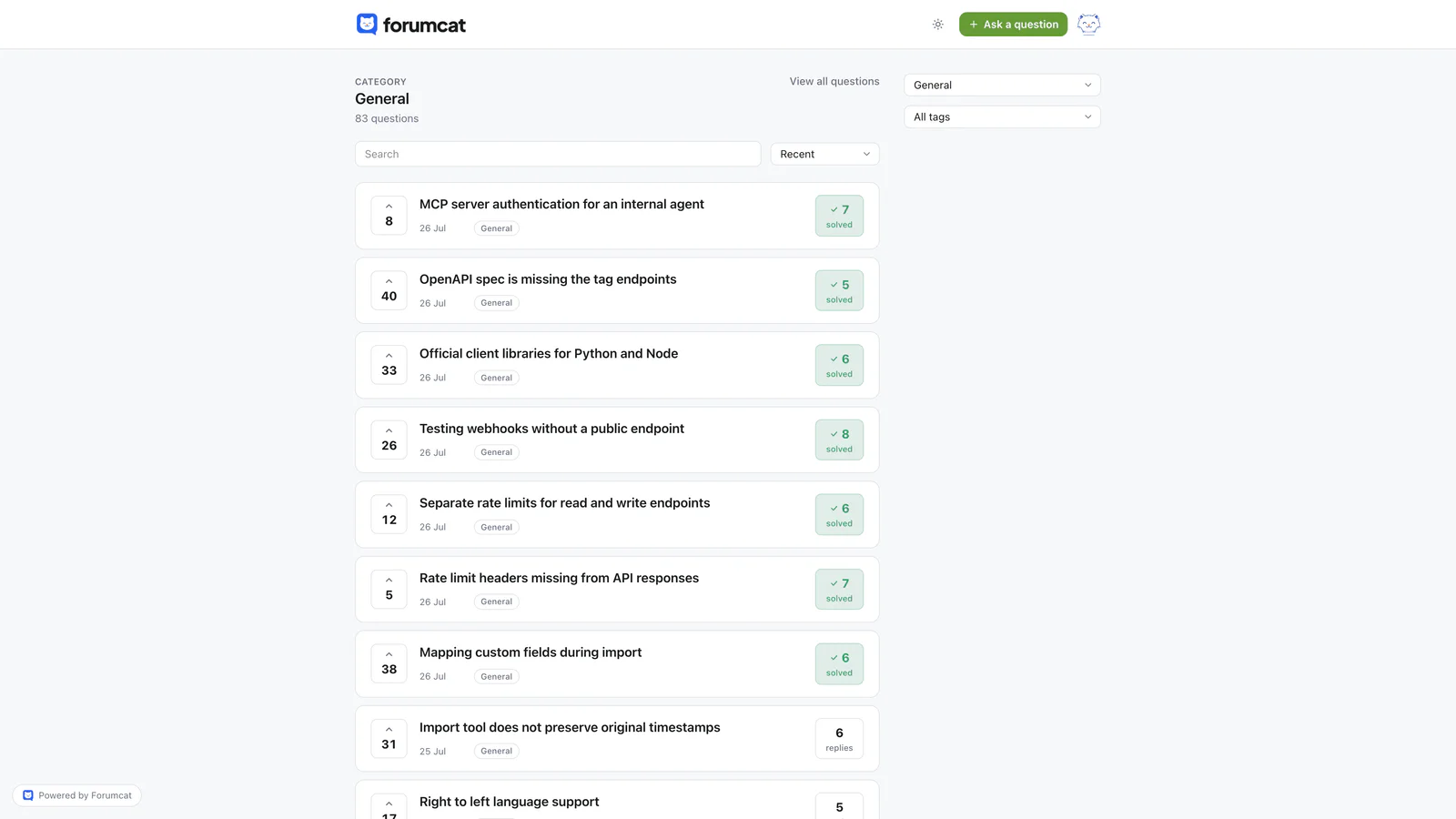
Shelves named the way customers speak.
Now seed it. Open your support inbox and find the ten questions you answer most often. Post each one as a question. Then answer each one yourself, in full, in plain words. You are writing both sides for now. That is fine, and it is not fake. These are real customer questions, written down where the next person can find them.
Try to end week one with ten answered threads. A first-time visitor should land on a page that already helps.
Days 8 to 21, build the habit
Weeks two and three are about one habit. When a repeat question arrives by email, do not answer it in email. Answer it in the community first. Then reply to the email with the link and one line of context.
That costs an extra minute the first time. It saves the whole reply the next time. This is how the library gets built, one question at a time.
Then make the place easy to find. Add a link in your website menu. Add a line to your email signature. Add it to your support auto-reply. Put it in the help section of your product if you have one. People cannot use a support forum they never see.
Answer new questions within a day. In the first month, speed matters more than polish. A short, correct answer today beats a careful one next week. You can always come back and improve it.
When a reply solves the problem, mark it as the accepted answer. The accepted answer is the single reply that gets pinned under the question, so the thread reads as solved. A reader can then see the fix without reading every comment. In Forumcat, either the person who asked or a staff member can mark it.
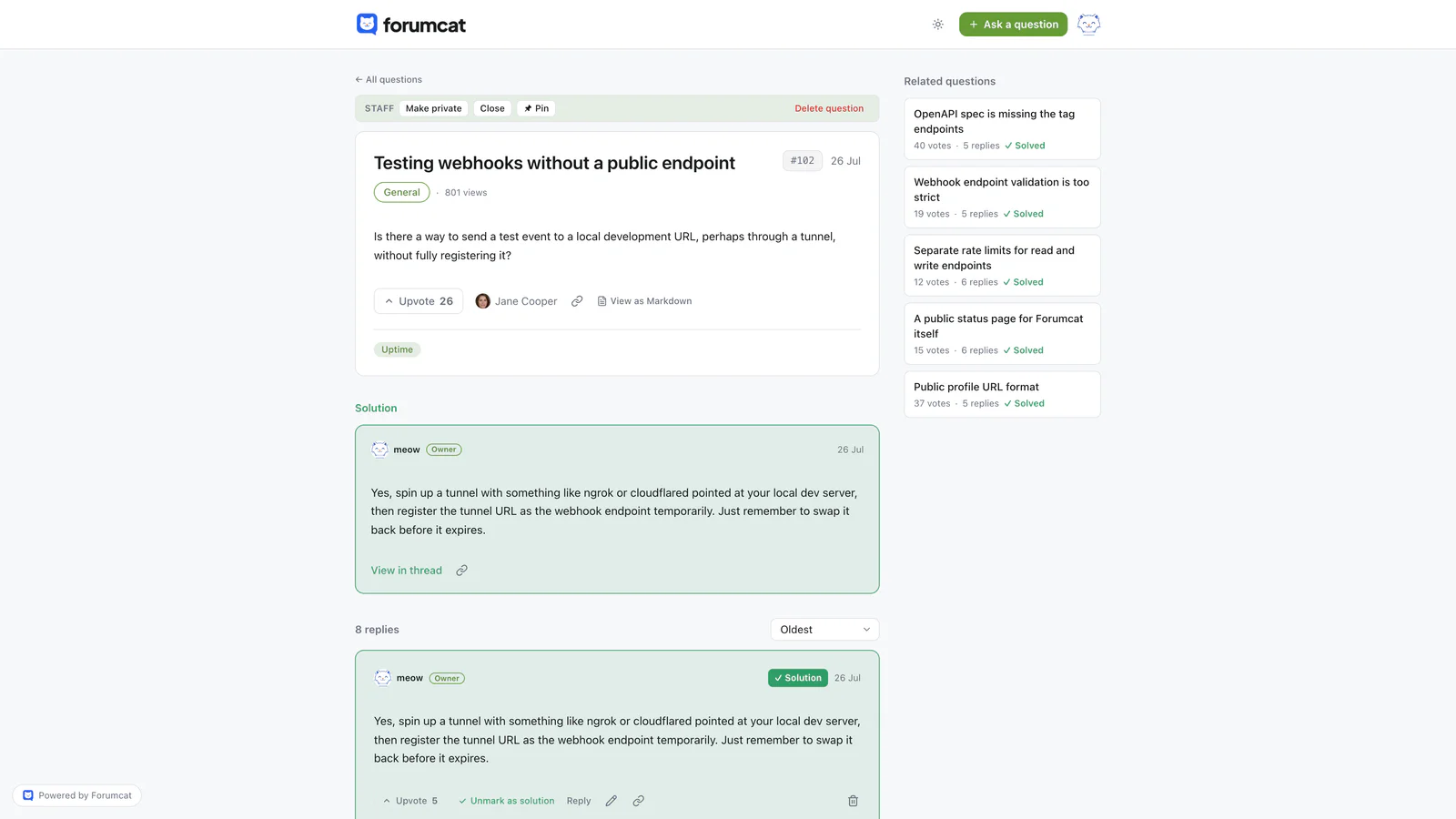
The accepted answer shows readers what worked.
Days 22 to 30, let members in
So far you have done all of the writing. The last week is about bringing other people in.
Write to your most active customers one at a time. Use their name. Keep it to two lines. Say that they have asked good questions before. Tell them where those questions now get answered in public, and ask them to post there. Ten personal emails will do more than one announcement to your whole list.
When a customer answers another customer, thank them in the thread, in public, by name. Do it every single time. That small act is what turns a reader into a member.
Do not add points, levels, or badges yet. Those reward volume. With a handful of active people there is nothing much to rank. The scores only draw attention to how quiet the place is.
What day 30 looks like
These are rough expectations, not measured results. Your numbers will depend on your traffic, your product, and how often people write in. Treat them as a rough shape, and compare month two against your own month one.
- A few dozen solved threads, most of them written by you.
- A few questions a week arriving on their own, without you asking.
- One or two answers written by a customer instead of by you.
- A little traffic from search, since answered pages are ordinary web pages.
The first answer written by a customer is the one to watch for. It means someone came back and felt able to help.
What to add later, and what to skip
Add one thing at a time, and only once the questions keep coming without you pushing. A monthly live session works well when there are enough regulars to fill it. A short monthly email with the best threads is easy to write and brings people back. Member spotlights are worth doing once you have members worth featuring. Badges and points can wait until there are enough people for a ranking to mean anything.
Skip engagement bait in a support community. Threads like "Friday chat, tell us your favorite feature" add noise to the search results. People come to your community to find an answer. Every post that is not an answer makes that a little harder.
None of this needs much money. A Forumcat portal on a Forumcat subdomain is $9 one time. A custom domain and higher caps are $99 a month. There is a 7-day free trial and no card is needed. The real cost of a customer community is your attention in the first month.
Keep reading: running a customer community and how to set up a customer support forum, and how to seed a new forum, and the types of online communities, and private vs public communities.